Canva AI Presentation Maker
by Canva Pty Ltd.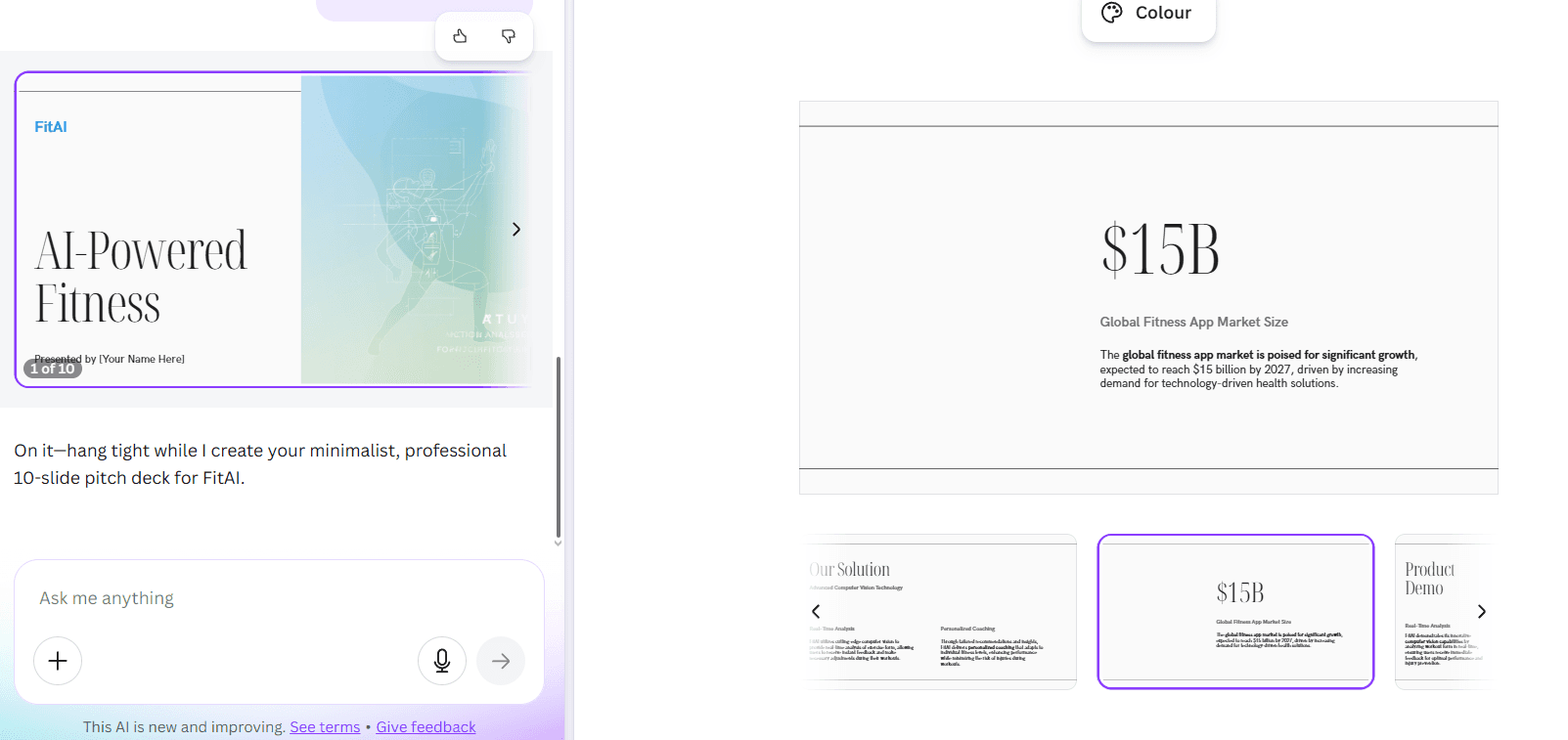
At a glance
Price
$0/year
Free tier
Yes
Platform
Web, Desktop, iOS, Android
Best for
Canva-native deck workflows
Learning curve
Easy
Last update
2026-03-25
Our take
Editorial verdict · We Did The Homework
Verdict
Canva AI is quick and usable for first drafts, but the AI editing loop is weak after generation. Pick it if you already live in Canva and do not mind manual polish.
What it is
Canva AI is best understood as a fast starting gun, not a full AI deck partner. In our test, it moved from prompt to style selection to editable outline in under two minutes, then produced a complete first draft almost immediately. That speed is real. If your goal is to stop staring at a blank slide and get momentum, Canva does the job.
What worked
What worked best in our runs was the front half of the workflow. The outline confirmation step gave us useful control before generation, and the final deck stayed visually coherent with the selected theme. Manual customization was strong once we entered the Canva editor — you can reshape layouts, rewrite text, swap assets, and polish slides with the same editing tools Canva users already know. Export quality was also a bright spot in our test.
The weak spot
The weak spot was AI iteration after the first draft. We could not get reliable prompt-based modifications with context awareness across the existing deck. Follow-up prompts tended to regenerate entirely new presentations instead of making surgical changes, and we did not get a useful generation history loop for iterative refinement. Visual quality from AI assets was also disappointing — images were often irrelevant, and we saw minimal use of meaningful icons, charts, or data visuals.
Versus Gamma
Compared with Gamma, which is currently the category leader for AI-first deck quality, Canva feels less opinionated as a presentation engine and more like a broad creative suite with an AI deck entry point. Gamma typically gives you stronger one-shot AI slide composition and a smoother AI refinement loop. Canva wins on ecosystem breadth, collaboration infrastructure, and manual editing flexibility, but its AI presentation behavior is less precise once you move past initial generation.
Our call
Who should use this: teams and creators already embedded in Canva who want fast drafts and are comfortable finishing the deck manually. Who should not: anyone expecting a chat-like, context-aware AI copilot that can iteratively improve the same deck without reset behavior. Canva AI is useful, but you need to accept the handoff from AI speed to human polish much earlier than the branding suggests.
What stands out
Prompt plus outline-first generation
Canva asks for direction, then lets you confirm and edit an outline before generating slides. This helps lock structure early instead of accepting a blind one-shot draft.
Deep manual editing inside Canva
Once generated, decks can be fully edited with Canva's mature editor. You can revise content, move elements, and restyle slides without leaving the workspace.
Brand Kit and style control
Canva's brand system remains one of its biggest practical strengths for teams. It is easier to keep colors, typography, and logos consistent at scale.
Collaboration and admin controls
Real-time collaboration, comments, and admin governance are built into team workflows. This matters more for organizations than solo creators.
Presentation and export ecosystem
Canva supports native presenting workflows and common export paths. In our test run, export quality came out clean and presentation-ready.
Pros & cons
Pros
Cons
Who it's for
Pricing
Free
$0/year
- One person
- Limited monthly premium AI access
- Basic Canva features
Pro
$144/year
- One person
- High AI access
- Expanded premium design and brand features
Business
$250/year per person
- Higher AI access
- Team collaboration and admin controls
- Shared brand workflows
Enterprise
Custom
- Advanced admin and security controls
- Enterprise procurement and governance support
Limitations to know
Bottom line
Get this if you already work in Canva and want fast first drafts you can polish manually. Skip it if you need strong context-aware AI iteration on the same deck.